DOUBLE NUCLEI? Comet Lovejoy
Taken by Vince on November 17, 2013 @ This was one of the best comet photos I've taken.
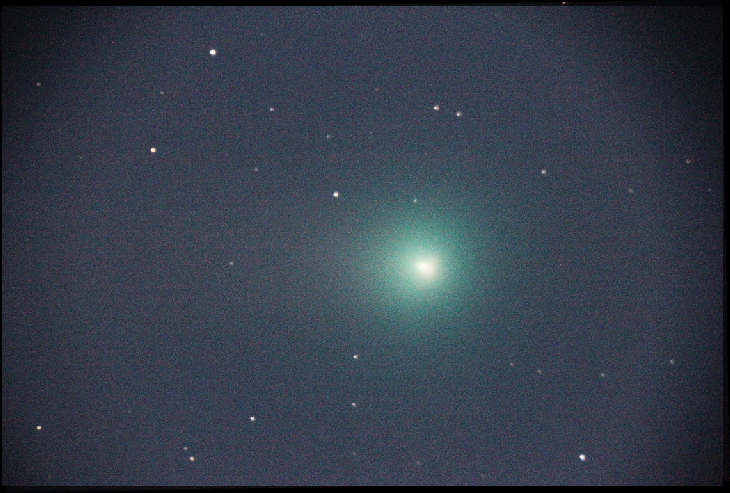
Click photo for larger image
  Camera Used: Unavailable Unavailable
Exposure Time: Unavailable
Aperture: Unavailable
ISO: Unavailable
Date Taken: Unavailable
 
More images
Details:
This was one of the best comet photos i've taken. This comet in several images did appear to have double nuclei. Not sure. It was VERY bright and easily visible in the view finder. Tail was not easy to see at all. Canon Rebel T2i - LX 200 Classic ** I really hate doing these photos... I need some help. My photos look grained up and also I don't think I have the right equipment. Money isn't an issue. What equipment do I need that will be able to get me photos like the professionals? Any help is appreciated cause this just doesn't look as good as the others and I am ashamed of my work... Thanks! My email is My3DWorldYT@gmail.com Please help guide me!
Photographer's website:
No URL provided.
Comments
  You must be logged in to comment.  
Thank you everyone who commented on this page. Not only did you help the photographer of this image, but others as well. (Specifically, myself)
Posted by Samuel034 2013-11-18 06:41:09
Oops, this is Comet Lovejoy... I messed up the Title... can someone edit for me please?
Posted by Comet1984 2013-11-17 15:56:26
Hi vince, it appears you already have everything you need to take professional photos. The secret the pros use is in the processing software. download the free application registax.

To remove the grains of your images, all you have to do is take 10 or more photos of the same object, then simply STACK them on top of each other using registax. The grain affect will disappear like magic!
Posted by amplelight 2013-11-17 16:17:33
http://www.astronomie.be/registax/
Posted by amplelight 2013-11-17 16:18:50
The software is very simple to use, when you click open, hold shift to select the multiple images, then choose your align point with a single mouse click. This will highlight a specific area, then you click the align button, then the limit button, then the optimize and stack button. The slider bars are to adjust sharpening and gaussian blurring to bring out fainter details.
Posted by amplelight 2013-11-17 16:20:49
another secret you can use to increase image quality and decrease noise, is to create a DARK FRAME, and FLAT FIELD frame. To create the dark frame you need to keep the lens cap on your telescope and record 10 or more frames of complete darkness. Then load them up in registax and click the create dark frame button, and save the image as .fit

To create a flat field you need to defocus your telescope so that everything is blurry and with the same process as the dark frame, record 10 or more images of the blurry atomosphere and stack them using the create flat field button.

If you google search for this you can find a comprehensive guide that goes into further detail.
Posted by amplelight 2013-11-17 16:25:20
Ample, I was awaiting a response to his question as well, because I have a Meade ETX90 I am going to start imaging with using my new Canon 6D, and I wanted to know how to stack/process my images. Thanks a bunch!
Posted by GangnamStyle 2013-11-17 18:23:42
Trying to download Registax but it wont allow it since CV210.dll is missing from my computer...
Posted by GangnamStyle 2013-11-17 18:25:10
Josh: i think you might have accidently downloaded the update, and not the full install. double check that you have the right download link for the full program first, then apply the update.
Posted by amplelight 2013-11-17 18:37:22
Im going to the link you provided, but I think I am installing the update. Ill find the full install.
Posted by GangnamStyle 2013-11-17 18:41:35
You were right! Thanks SO much!
Posted by GangnamStyle 2013-11-17 18:43:26
full download version 6.0 link
http://www.astronomie.be/registax/setupregistax6.exe
Posted by amplelight 2013-11-17 18:45:35
update for version 6.0 link
http://www.astronomie.be/registax/updateregistax6.exe
Posted by amplelight 2013-11-17 18:45:56
version 5.0 full download link.
http://www.astronomie.be/registax/setupregistax5finalold.exe
Posted by amplelight 2013-11-17 18:46:35
version 5.0 to 5.1 update link
http://www.astronomie.be/registax/setupregistax5_1.exe
Posted by amplelight 2013-11-17 18:47:25
registax user manual link
http://www.astronomie.be/registax/registax5usermanual.pdf
Posted by amplelight 2013-11-17 18:47:56
Okay, thanks. I have 160 images of M8 with R, G, B, Halpha, and OIII filters I am going to experiment with.
Posted by GangnamStyle 2013-11-17 18:49:49
Have fun and good luck with clear skies!
Posted by amplelight 2013-11-17 18:53:19
Thanks!
Posted by GangnamStyle 2013-11-17 18:59:02
GangnamStyle and Amplelight, thanks a bunch. Amplelight, I tried the software but what I need to do from now on is take my time imaging... do a LOT of shots and use Dark Images... I use no dark images so that might be my problem. I heard RegiStax is for planets only... but well see.


GangnamStyle, please email me at my email I provided. Id love to keep contact on how your imaging worked and maybe pick your brain a little! Let us all work at this together and be the next Gen Astrophotographers! Thank you!!
Posted by Comet1984 2013-11-17 23:12:29
 
The Northern Lights: A Magic Experience
Aurora photo tours
Support SpaceWeather.com
Home | FAQ | Contact the Webmaster
©2019 Spaceweather.com. All rights reserved.