Comet Catch How Stacking Helps
Taken by Todd Bush on January 7, 2016 @
Banner Elk, NC, USA
Click photo for larger image

| |
Camera Used: NIKON CORPORATION NIKON D7100
Exposure Time: 300/10
Aperture: f/4.0
ISO: 3200
Date Taken: 2016:01:07 11:04:03
|
|
| More images
Details:
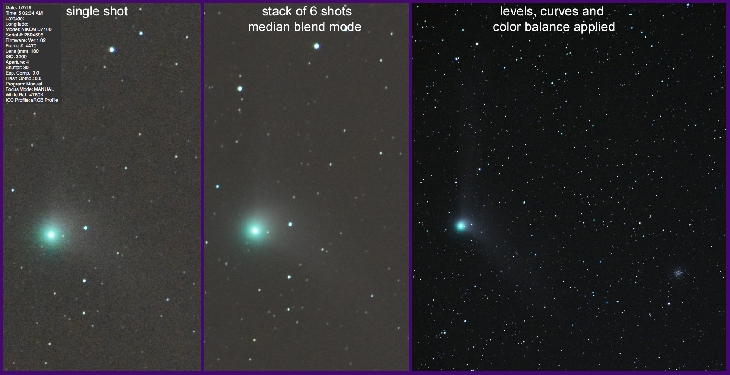
The exposure info for the single shot is listed in the photo. Having become a fairly recent advocate of using the technique of stacking to improve astrophotography results, thought this shot might illustrate the progression of 3 steps involved. The second step, Stacking, is primarily to minimize the effects of Grain by averaging (smoothing) the grain (that which changes from shot to shot) and leaving the fixed stars or objects (that which doesn’t change much from shot to shot) basically alone. It improves details as well.
These were made with my camera & lens on an iOptron Sky Tracker and processed in Adobe Photoshop CC, but the same technique could apply, whatever tracker & software you use.
1.Compose & find correct exposure and take a bunch of shots. In this case I set the camera interval timer for 33 then I reviewed to find the ones that were tack sharp and not wiggly from wind or me.
2. Select the File/Script in photoshop, “Load (selected) Files Into Stack”. Align the Layers, create a Smart Object of all the Layers, then apply the Layer/Smart Object/Stack Mode (in this case I used Median)
3. Go wild with your favorite image adjustment tools, as you might to improve any image. A good first stop in Levels is to adjust the shadow slider to the right to darken blacks. Get the contrast and colors right (however you like) and ‘Voila!
Photographer's website:
http://www.bushphoto.com
|
|
|